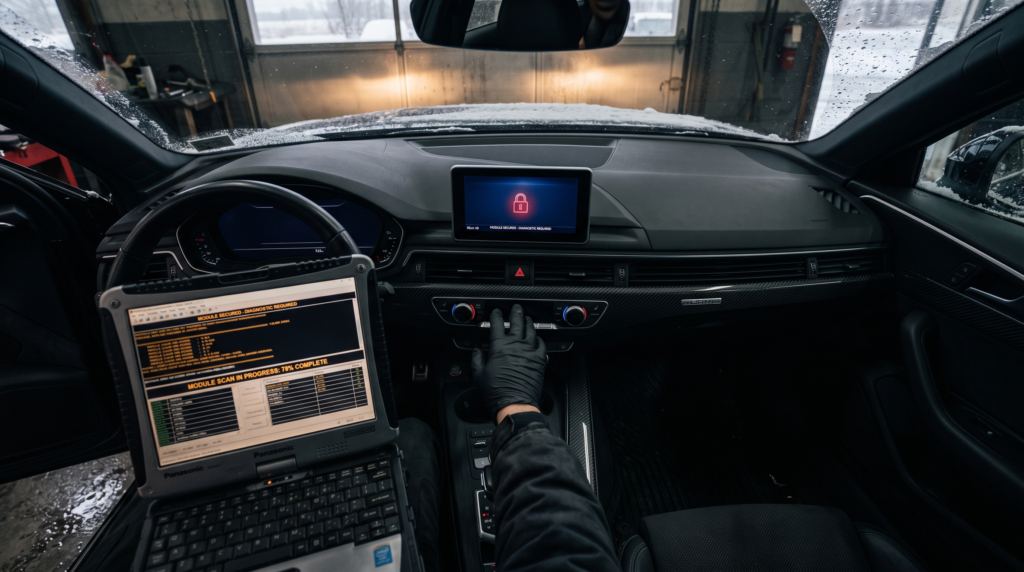
You swapped the MMI in your Audi, powered it up, and half the system is dead. No navigation. No sound. Maybe a red padlock icon on the screen, or a menu that never loads. This is the classic Audi MMI not coded after replacement fix scenario, and in most cases the unit is not faulty at all. The replacement head unit has simply never been coded and adapted to your specific car. Every MMI is a networked control module sitting on the infotainment CAN bus. Drop in a new or used one and it still carries the coding, and the component protection, of the vehicle it left. Until a technician codes it to your VIN and clears component protection, the MMI stays half-asleep.
Here is the short version of the Audi MMI not coded after replacement fix. The module needs three things done in the right order: component protection removal, long coding to match your equipment, and adaptation of the feature codes. Miss any one and the screen lights up but the functions do not. Let me walk through what is actually happening and how a proper coding session brings the MMI back to life.
What “Audi MMI Not Coded After Replacement” Actually Means
MMI stands for Multi Media Interface, Audi’s infotainment platform. It has run through several generations: 2G on the older A6 C6 and A8 D3, 3G and 3G+ across the A4 B8, A6 C7, A7 and Q7, then the MIB, MIB2 and MIB3 units on the newer MLB, MLBevo and MQB platforms. Whichever generation you have, the main unit lives at diagnostic address 5F, Information Electronics Control Module 1. That module holds a long coding string that tells it exactly what your car is fitted with, from the amplifier type to whether you have factory navigation, DAB radio, or a reversing camera.
When you fit a donor MMI, that coding belongs to the old car, not yours. On top of that, the module arrives with active component protection tied to the previous VIN. So “not coded” really means two problems stacked together. The coding is wrong for your equipment, and the security system sees the MMI as a foreign part. That is the heart of every Audi MMI not coded after replacement fix, and it is why plugging in a tested working unit still leaves you with a dead dashboard.
Why the Replacement MMI Stays Locked (Component Protection)
Component protection, or Komponentenschutz in the factory documentation, is an anti-theft feature. Audi and Volkswagen tie certain modules, including the MMI and instrument cluster, to the car’s identity. If someone strips a control unit from a crashed car and bolts it into another, the module refuses to function until it is properly adapted. Good for theft deterrence. Frustrating when you are the one doing a legitimate repair.
Clearing it is not a simple button press. Component protection is removed through a secure online session, using ODIS with GeKo credentials, that talks to the Audi servers and re-registers the module to your VIN through an SVM (Software Version Management) action. Independent specialists do the same job with dedicated tooling, which is exactly what a component protection removal service handles. Diagnostic tools like Ross-Tech VCDS (ross-tech.com) will show you the component protection status in the module scan, but the removal itself needs that secured online access. This step is non-negotiable in any real Audi MMI not coded after replacement fix.
Common Symptoms of an Audi MMI Not Coded After Replacement
Owners describe the same handful of symptoms, and workshop techs see them daily:
- MMI boots to the logo then loops, or freezes on the Audi splash screen
- Screen works but there is no sound from any source
- Navigation shows “not available” or the map database is missing
- Bluetooth and phone pairing are greyed out
- The reversing camera image is black or absent
- A red padlock or a “component protection active” message appears
- Whole menus are missing compared to how the car left the factory
None of these mean the hardware is bad. They are the signature of a module running someone else’s coding with security still flagged.
Fault Codes That Show Up Alongside It
Run a full auto-scan and you will usually find related entries. The MMI module at 5F stores a component protection fault. The gateway at address 19 may flag the MMI as missing from the installation list, because it has not been coded into the car’s network map. On the infotainment CAN you often see U-codes for lost communication, such as U111300, where other modules cannot reach the head unit properly. Coding-fault entries about implausible or missing adaptation values are common too. These codes are symptoms of the same root cause, so chasing them one by one is a waste of time. Fix the coding and component protection and the list clears together.
The Audi MMI Not Coded After Replacement Fix, Step by Step
Here is how a proper job runs, whether it is on a lift in a bay or done remotely over an OBD interface:
1. Full auto-scan. Read every module, confirm the MMI is communicating, and note the component protection status and any coding faults. You cannot code what you cannot see, so a healthy CAN connection to address 5F comes first.
2. Component protection removal. Run the secure online adaptation to strip the donor VIN and register the MMI to your car. This is the gate. Skip it and nothing else sticks.
3. Long coding. Set the module’s long coding to match your exact equipment. Amplifier, navigation, DAB, camera, TV tuner, voice control: every option is a byte or bit that has to be right. This is where professional ECU programming and coding services earn their keep, because a wrong bit can disable a whole feature.
4. Feature codes and adaptation. On MIB units you also enable the FEC and SWaP feature codes for functions such as navigation maps. Older 3G units need their adaptation channels set. This restores the features your trim is supposed to have.
5. Verify. Re-scan, clear the fault memory, then test in the car. Sound, navigation, phone, camera, voice. A finished Audi MMI not coded after replacement fix means every function your car shipped with works and the scan comes back clean.
Get the order wrong and you go in circles. Coding before component protection removal, for instance, often will not save. That single sequencing mistake is behind most botched DIY attempts at the Audi MMI not coded after replacement fix.
Can the Audi MMI Not Coded After Replacement Fix Be Done Remotely?
Yes, and this surprises people. Because coding and component protection run through the diagnostic port, a technician does not need to physically hold your car. With a supported OBD interface plugged into the port under the dash and a laptop online, a specialist can take a full scan, run the secure component protection adaptation, and code the MMI from anywhere. Our remote VAG programming service does exactly this, which is often faster and cheaper than a dealer visit and works the same on an A3 as on an A8.
In-person still makes sense in a few cases. If the MMI will not power up at all, if there is a wiring or fibre-optic (MOST bus) fault, or if the unit needs opening for a hardware repair, hands on the car beat any remote session. A good shop will tell you honestly which path your car needs. For a straightforward Audi MMI not coded after replacement fix where the unit powers up and talks on the bus, remote is usually all it takes.
The Bottom Line
A replacement MMI that boots but will not work is almost never a dead unit. It is an uncoded one. The Audi MMI not coded after replacement fix is a methodical job: clear component protection through a secure online session, code the module to your VIN and equipment, enable the right feature codes, then verify. Audi (audi.com) built the MMI to be locked to one car on purpose, so the paperwork of adapting it to yours is simply part of the swap. Do it in the right order and the screen you thought was faulty comes fully alive. Whether you are an owner who just fitted a used unit or a workshop that wants a coding partner on call, the fix is well within reach, and much of it can be handled without the car ever leaving your driveway.
Is Your VAG Vehicle Showing This Issue?
Whether you are a car owner dealing with a fault, a workshop needing a specialist partner, or an enthusiast looking to unlock your vehicle’s full potential, VAG Programming offers expert remote and in-person ECU coding, programming, and diagnostics for Audi, Volkswagen, Porsche, Bentley, and Lamborghini worldwide.
Contact us today and let’s fix it the right way.